Light Stats
macOS menu bar instrument
LIVE
Free · Open source · macOS 14+

Know if your Mac is actually struggling.

Live pressure signals folded into one health score, with optional AI, network, and Finder context. No telemetry and no outbound requests unless you use or enable a network feature.

MIT · macOS 14+ · no dependencies

The panel

Default · Overview · Memory
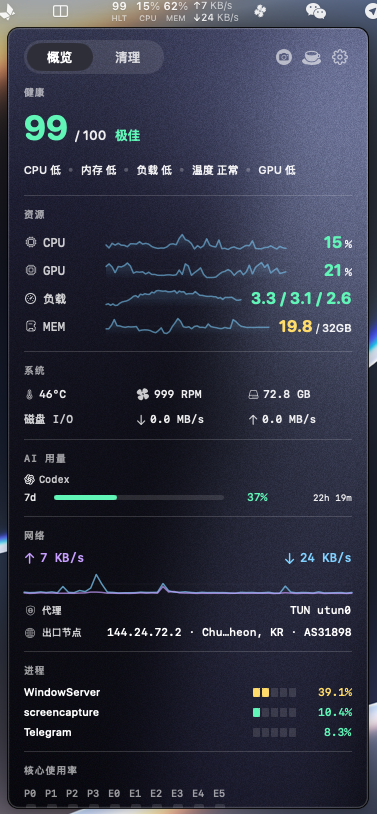
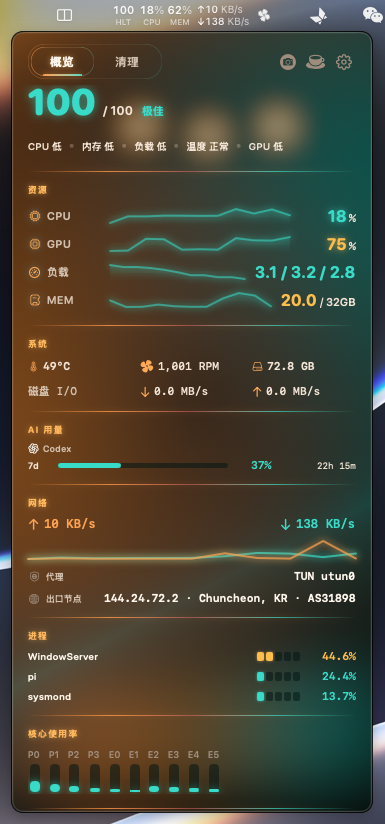
Light Stats overview panel in the Default theme: health score, CPU, GPU, memory, battery, AI usage, network, processes, and per-core bars.
Overview · Default
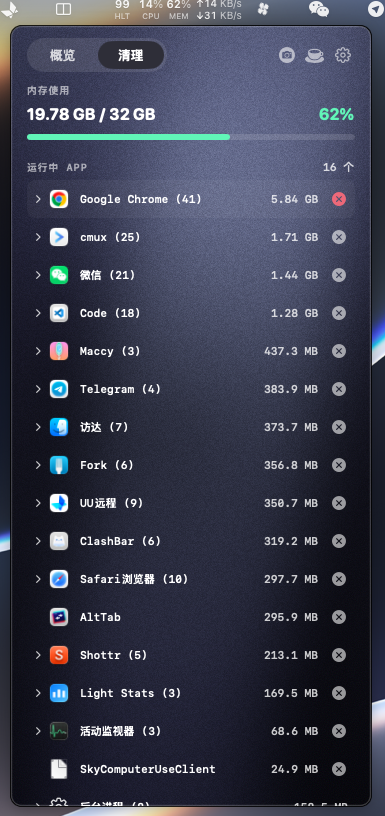
Light Stats Memory tab in the Default theme: apps listed by memory footprint with quit actions.
Memory · Default

Themes

Default · Bento · Sun Gold · Ink Night
Default theme overview
Default
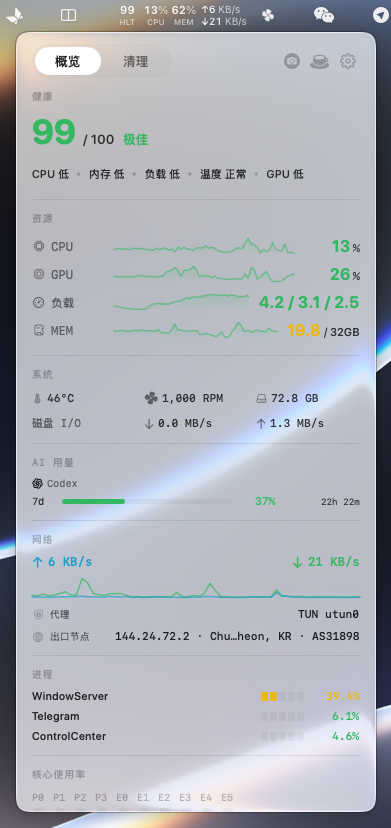
Bento Grid theme overview
Bento Grid
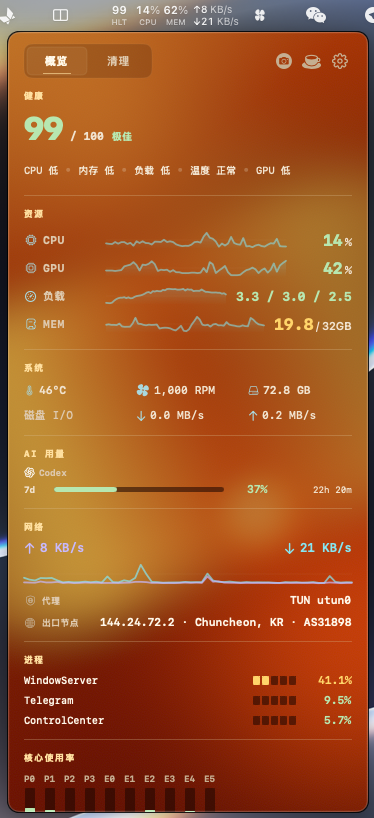
Sun Gold theme overview
Sun Gold
Ink Night theme overview
Ink Night

What it reads

11 signals · 1 score
Compute
  • CPU load %
  • Per-core usage P + E
  • GPU utilization %
Memory
  • Pressure level
  • Used / total GB
  • Swap ratio
Storage
  • Disk capacity GB
  • Read / write MB/s
Network
  • Up / down KB/s
  • Proxy state TUN
  • Exit node geo
Power
  • Battery %
  • Temperature °C
  • Fan RPM
Intelligence
  • Claude Code 5h / 7d
  • Codex 5h / 7d
  • Gemini quota
01 / Health

One number for "is it sluggish right now"

The 0–100 score reads live pressure, not capacity. CPU saturation, memory pressure and swap, load average per core, temperature and thermal throttling, GPU. A Mac with 30 GB used and many apps open stays green if it isn't actually struggling. The score only drops when the system is.

A single saturated dimension caps the total, so the number tracks the bottleneck you feel, not a flattering average.

02 / Network
Differentiator

Network truth, not just speed

Throughput is the easy part. Light Stats also detects whether you are behind a proxy and, when you opt in, which exit node you are actually leaving through, with its geo-location and AS number.

Exit lookup is off by default, and the first time you enable it the app explains exactly what it sends. See the privacy policy for every optional network behavior.

03 / Agents

Claude Code, Codex, and Gemini usage

When enabled, Light Stats uses credentials already stored by each provider's CLI to request current subscription windows from that provider. Optional Claude and Codex warmup can send a minimal headless message after a rolling window resets; it has a separate switch and is off by default.

04 / Finder

Developer actions where the files are

The optional Finder extension can copy paths and names, open a chosen terminal, create files from curated templates, move or copy selections, open them with configured apps, toggle hidden state, and start cmux windows or workspaces.

05 / Defaults

Nothing extra runs until you ask

Monitoring stays read-only. AI requests, exit-node lookup, automatic update checks, the Beta update channel, Finder actions, window and scroll event taps, and display keep-awake are all opt-in. A clean install makes no outbound request and asks for no Accessibility permission.

06 / Appearance

Four looks for the instrument, not the settings sheet

Default is the cold-start readout (system materials: Liquid Glass on macOS 26+, ordinary chrome on macOS 15). Bento Grid keeps the classic card layout. Sun Gold and Ink Night are optional mesh surfaces with grain and light-dynamics controls. Settings stays a plain white tool panel so configuration never competes with the dial.

Light Stats is local by default. It has no analytics, crash reporting, advertising, account system, or developer-operated telemetry endpoint. Optional features contact only the service needed to perform the action described below.

Zero outbound by default

Exit-node lookup, AI usage requests, Claude/Codex usage-window warmup, automatic update checks, and the Beta update channel are all off by default. A clean install reads local system metrics only and makes no network request.

Data collection

Light Stats does not collect or send data to the developer. System metrics are read locally and shown on your device. The app reads, for display or user-requested actions:

  • CPU load and per-core utilization
  • GPU utilization (supported Macs)
  • Memory pressure, used, available, swap
  • Disk capacity and disk I/O throughput
  • Network up/down throughput and local proxy configuration
  • Battery, temperature, and fan RPM (supported Macs)
  • Running applications and their memory footprint (Memory tab)
  • Credentials and local state already stored by Claude Code, Codex, and Gemini CLI, only when the matching AI provider is enabled
  • Selected Finder paths and Finder-menu preferences, only when the Finder extension is enabled

Local processing

Metric sampling and scoring happen on your device through macOS system APIs (Mach, IOKit, SMC, CFNetwork, Network). App preferences and Finder-menu configuration are stored locally in UserDefaults and the app group. The app does not upload system metrics or process lists.

Exit-node detection

When enabled, this feature sends a request to a public geo-IP service and caches the result briefly to avoid repeated lookups. It transmits no personal data beyond the network request itself, which necessarily reveals your IP to that service, the same as visiting any website. Disable it and no such request is ever made.

AI usage and optional warmup

When an AI provider is enabled, Light Stats contacts that provider's own usage endpoint using credentials already stored by its CLI. Claude Code and Codex also have separate, off-by-default warmup switches; after a rolling window resets, warmup sends the minimal headless prompt “ok” through the selected provider's CLI, discards normal output, and uses a temporary empty working directory. Gemini has no warmup.

Update checks

A manual update check, or the off-by-default automatic update setting, contacts GitHub Releases. The update channel can be Stable (final releases only) or Beta (also considers prereleases such as v1.9.0-beta.N); Beta is off by default. Downloaded updates must pass codesign, notarization, and Team ID verification before installation.

Local diagnostic logs

The app can write structured diagnostic logs to disk under its support directory (and to Unified Logging). Levels are Off, Errors only, or Full (default Full). Logs are rotated, retained for a limited window, redacted for sensitive fields, and never uploaded to the Light Stats developer.

Third parties

No analytics, crash reporting, advertising, or third-party SDKs. Depending on the switches you enable, requests may go to the selected geo-IP service, Anthropic, OpenAI, Google, or GitHub. Credentials are never sent to a different provider or to the Light Stats developer.

Open source

The full source is on GitHub. You can inspect exactly what the app does, including every network call.

Changes

Any change to this policy will appear here and in the app's release notes. Data handling will never change silently.

Last updated: July 12, 2026

Light Stats is an open source project. Here is how to get help, report issues, or contribute.

Report a bug or request a feature

File an issue on GitHub. Include your macOS version, Mac model, and steps to reproduce. A screenshot of the panel helps.

→ github.com/EvilIrving/light-stats/issues

Email

For security concerns or private inquiries, email directly. Response within 2–3 business days.

→ jescain2024@gmail.com

Frequently asked

How do I change what shows in the menu bar?
Click the ellipsis (…) in the panel to open Settings, then toggle items under Status Bar Items. You can also choose which dimensions feed the health score.
What are the visual themes?
Settings → General → Theme. Default is the cold-start instrument look; Bento Grid uses cards; Sun Gold and Ink Night are optional mesh surfaces. The Settings window itself stays white and does not follow the panel theme.
Does exit-node detection cost me privacy?
Only if you turn it on. It is off by default and shows a disclosure before its first lookup. Other optional network features are documented in the Privacy tab and are also off by default.
Why do some readings show N/A?
GPU, fan, and battery require supported hardware. A desktop Mac with no battery, or a Mac without those sensors, shows N/A and drops that dimension from the score.
Does it affect battery life?
The default refresh is 2 seconds. You can choose a 5-second interval in Settings to reduce sampling frequency.
Is force-quitting safe?
Force quit bypasses an app's normal shutdown and can lose unsaved work. The app confirms first. Prefer a normal quit when you can.